Adding a new ZBT-2 and Matter devices to my Home Assistant install, and the fun thereof.
Friday, January 30, 2026 at 13:05:04
Recently, I updated my Home Assistant system with a couple of new items that enable thread and matter support. The first is the official “Home Assistant Connect ZBT-2,” a device that much like it’s predecessor, allows either ZigBee or Thread/Matter connections - but not both. The second is one of Ikea’s new Matter devices, a “Timmerflotte” (wood raft) temperature/humidity sensor with a name that was obviously pulled from the same void that most of Ikea’s names are pulled from.
Here’s the ZBT-2:
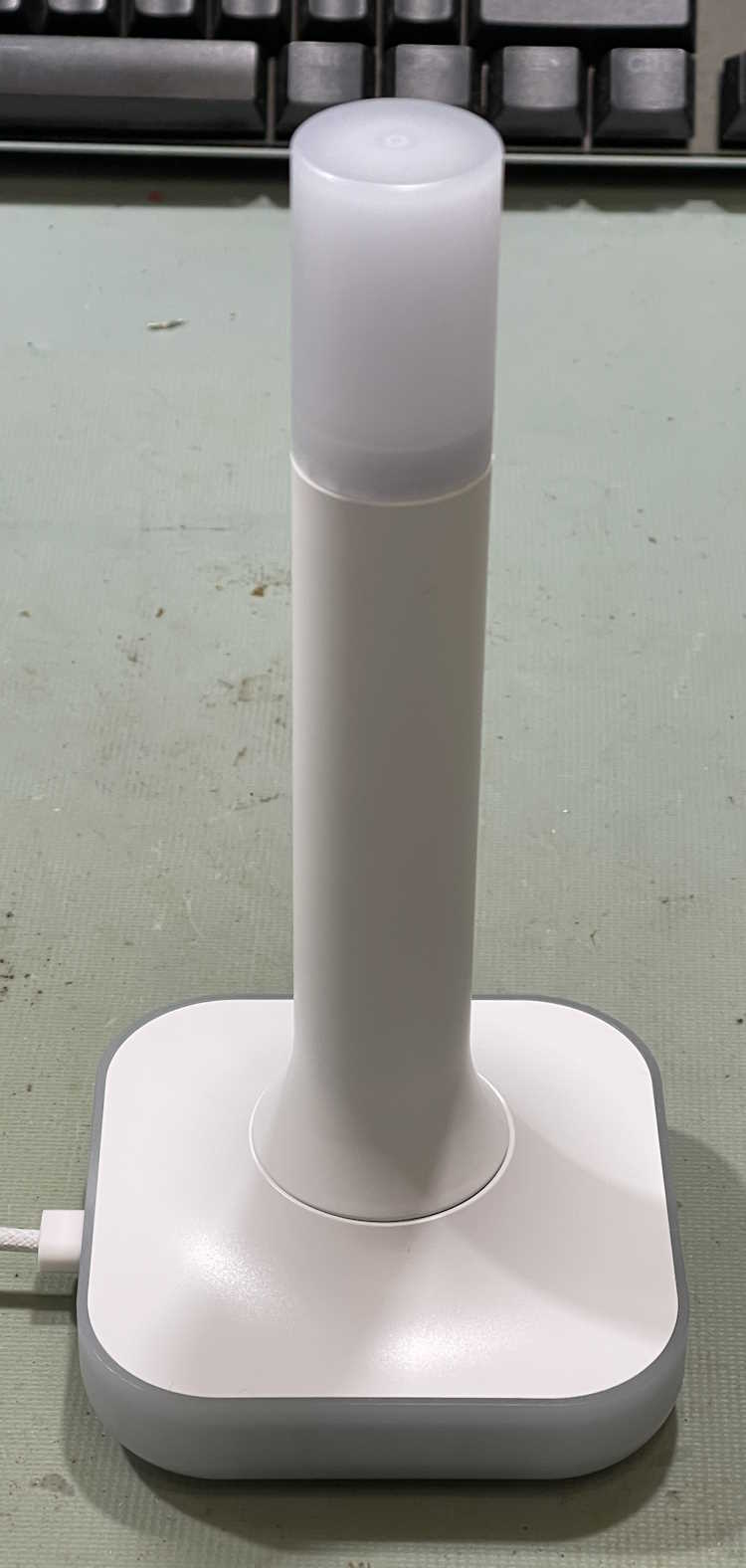
This is basically the z-wave device’s little brother. It supports a ZigBee connection, OR can act like an Open Thread Border Router for Thread devices. It’s a beefy device, heavy enough that it stays put, and comes with a decently long USB A to C cable for connection to your HA device. As it has a real antenna, the range of this device should be much better than the little PCB antenna on it’s predecessor, but YMMV here as I can’t test that due to all of my devices being in a relatively small area that the ZBT-1 has no problem reaching from the other end of the house.
You’ll notice this device has a translucent top. That’s because there are 4 RGB LEDs in the base that transmit light to the top via a lightpipe. You can’t use these LEDs from within Home Assistant, however, so I’m not sure why they are there. The unit lit up blue during the initial setup, and now it’s dark. Unless they’re going to add these as a controllable entity later in the process, I don’t know why they are there - it’s just added expense and devices that will never get used.
This device should just be plug and play, however, when I plugged it in my Home Assistant Green didn’t see it. A reboot didn’t cause the device to see it. I unplugged and plugged a few times before the Green finally decided it was connected. After connection, you have to choose what you want it to be, and I chose Thread. Home Assistant then begins to upload the firmware and configure the device, after several minutes it releases it and you’re ready to start adding things.
I did notice that, according to Home Assistant, this is a “bronze” level support device. Why is a device made by the official provider of Home Assistant - it’s own product - at a lesser support level than the top tier? I have no idea, but that seems to indicate to me that they rushed this out a bit earlier than needed. There shouldn’t be anything lower than platinum (top) tier support for your own product.
But, after messing with it for some time, it did work, and appears to Home Assistant as what it should be.
The device I wanted to add was one of Ikea’s new Matter sensors. This one, the Timmerflotte, is a standalone temperature/humidity sensor. It uses AAA batteries, which is a nice feature. It’s rather large, however, but does offer a hook hole on the back for you to hang it on the wall or wherever. The batteries are under the back which pops off with a little screwdriver slot. You can also access the reset button here, as well as the C°/F° switch. They come set to celcius, so I switched the device while I installed batteries. It immediately goes into pairing mode when you put batteries in, but will time out after a while. I set it aside and let it time out.
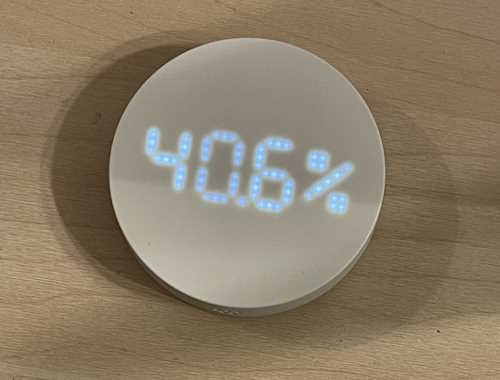
You’ll notice it’s big. Bigger than other temperature pucks. At least you would have if I’d given some scale…sorry about that! It also has a display on the front, a white LED display made up of point-source LEDs that activates when you push the top down. It shows temperature, then humidity, then turns off. That’s cool and all, but only if you have it out where you can access it. If you’re using these for measurements in, say, a cabinet or some other hard to access place, it’s kind of useless. But it’s there, and I guess someone thought it was a good idea.
So, how to connect it to Home Assistant?
The ZBT-2 process installed the needed Thread components, andI I installed the Matter component in HA’s devices and services. No issues there.
The weird stuff started after that. There’s no easy way to add a matter device to your system when it’s running over thread. With ZigBee, you put your host in search mode, and push the pair button on the device. Device and host have a conversation about capabilities, and you’re done. Nothing else needed. Matter - at least over Thread, I haven’t had a network device to try yet - requires a middleman. In this case, you have to take a picture of a QR code with your phone, or link via BlueTooth first before the host can find the device. Another layer of complexity between you and getting this device on your host. So, I used the camera (which was very flaky about finding the QR code, it kept wanting to identify the batteries) to capture the code. It started to pair. I had also held the reset button on the timmerflotte until it started flashing an LED, I’m not sure if you need to do that. The whole thing is somewhat arbitrary, but it didn’t seem to hurt.
And just sat there, and failed.
Why?
No indication of errors in Home Assistant, which is certainly a problem endemic to Home Assistant and it’s services. It’s very unhelpful when something fails, this particular service didn’t tell me anything about the failure except that it did. But, I finally figured it out - Matter requires IPv6 to work. Why does it need this for a local radio protocol? I have no clue, but it does. That’s how Matter is written. No IPv4 for you! Of course, I’ve had IPv6 turned off on the router since it was new, as it’s not necessary for a home network to have it and it’s caused me problems in the past. Turned it back on (thankfully I hadn’t deleted the IPv6 package) and enabled it in Home Assistant, and there it goes. It connects, adds, offers a firmware update, and everyone is happy. I’m able to put it in graphs and automations.
So why the IPv6 for a local radio protocol? It doesn’t need it - but Matter is capable of being used on multiple carrier protocols - Thread, WiFi, BlueTooth (I assume, anyway,) so while you don’t need it for the Thread connection, you can have many many devices on WiFi without running out of addresses. I guess if you’re planning on having 250+ units on one network node, that’s great. Otherwise, it’s just another network protocol you must have on simply because some dev thought it was cool.
So what would I do differently here? The Matter service in Home Assistant just assumes things, much like Home Assistant assumes that the time your router is giving it is correct. Assumptions lead to broken things, and this was no different - the Matter service should immediately check to see if IPv6 is there, and if not then stop and say so. Or at least check when it’s installed. That’s the biggest problem I’ve found with HA, that of assumptions. You can’t and shouldn’t do that. But they do, and it breaks.
But it’s fixed for me, and hopefully this will prevent some grief for you. Just remember, X10 forever!
A few days later…
The Timmerflotte worked fine for about 3 days, then started dropping off and then refused to connect. There are many many reports about these devices being unreliable, and the entire matter-over-thread ecosystem being a mess. There’s even a big github bug report about it where a dev angrily talks about how you need good RF penetration to make it work. See https://github.com/h … uecomment-2604219962 for that thread, and basically just search on timmerflotte disconnect from home assistant for a lot of noise on the subject. On that, I would think the ZBT-2 stick is a good RF network provider, but I guess not?
The short story is that matter can be unstable, especially if you have older devices. Some have good luck, others do not.
I did try to move the sensor closer to the antenna and re-power it, but it just doesn’t want to connect again, even though the device still functions as a press-to-see sensor. I do have some more on order, I may end up just taking them back until the ecosystem matures.
Stay tuned!