Connecting Home Assistant and X10
Tuesday, March 3, 2026 at 07:55:48
If you’ve been around for any length of time, you’ve probably heard the term X10 thrown around. This is doubly true of anyone who has had an interest in home automation, as X10 is the granddaddy of all consumer controllers. If you haven’t been around since the 70s, you may know X10 from those creepy “Spy on half-naked women next door” camera ads from the early days of the Internet.
X10 was nvented by a Scottish company (Pico) in 1975 and marketed by BSR (the cheap turntable company!) it was eventually picked up by multiple vendors. Leviton made modules for BSR, and later simply became white label devices or X10 Powerhouse branded units. GE offered Home Minder. Radio Shack’s brand was Plug ‘n Power. Stanley Tools sold Lightmaker. IBM used Home Director. RCA offered Home Control devices. Magnavox, Sears - countless others with names from the past offered them. There were other, smaller names that had all kind of doodads and interfaces that spoke X10, and GE even had a set-top programming box that was just downright futuristic. There’s a wealth of devices out there, and it’s still in use - albeit at a much lower rate than it was in the past due to the uptake of cheap wireless devices.
But, the stuff is still there and it’s still just as useful as it was way back when, especially now that noisy CF lamps have basically vanished.
X10: How does it work?
X10 is a home automation system that uses digital pulses that ride on the AC line to address modules. It uses a “house” code, a 16 bit number, followed by some “key” codes. The House and Key are heard by the entire system, but only the module with the appropriate settings will respond, unless it’s a ALL code. The good. bad, and ugly of this system is that you can have any number of modules with the same address because they don’t talk back, but the bad is they don’t talk back so you don’t know if they responded to the command. The ugly is since the signal is on the AC line, it can be interrupted by noise, or lost due to distance from the controller to the listener.
There are plenty of whitepapers on X10 out there, you can read a technical perspective of the system here.
Why use it when zigbee, zwave, and matter wireless devices exist?
There’s a massive base of X10 products out there, and some work without the need for heavy lifting. That is, you can have standalone clocks and controllers that don’t boot and don’t require an OS to continue working. There are modules, remotes, controllers of all types, even landline phone interfaces available should you have such items available.
For example, my X10 system contains the following things:
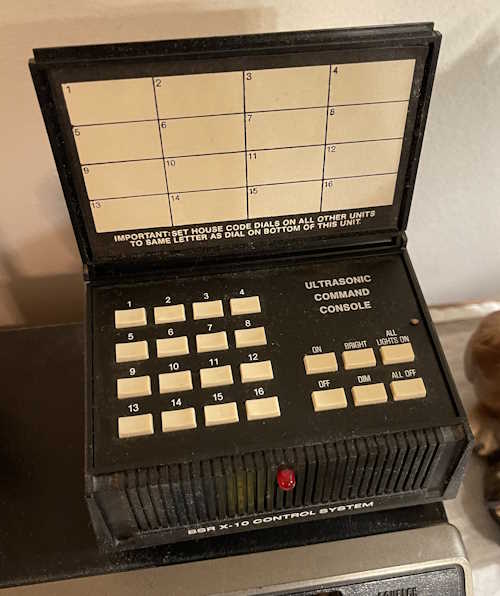
A BSR Ultrasonic Remote Control base unit (remote not shown)
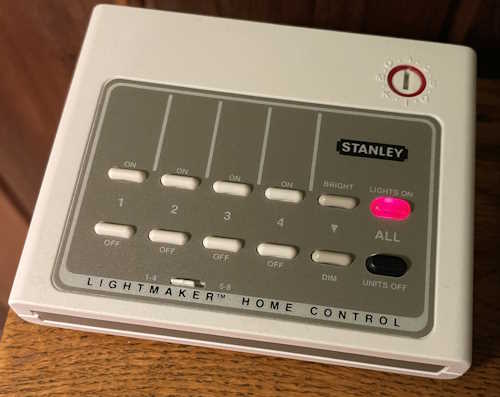
A Stanley Lightmaker desktop controller
A Stanley Lightmaker Clock Controller
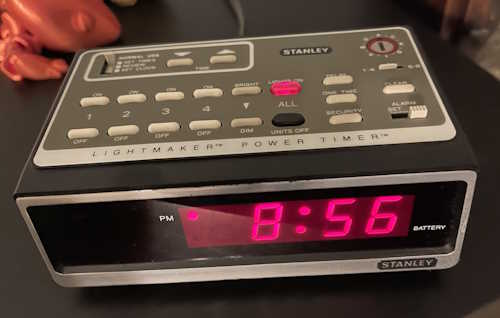
The clock controller is the failsafe for the system. If power fails and the system shuts down when I’m not there, then power resumes, the battery backed up clock will still perform basic functionality - no network connections needed. It handles what I consider to be important lighting to make the house look lived in - main rooms, outside doors, and other things of interest. However, I’d still like to talk to these devices with Home Assistant. I’ve found that there are three ways to do that, but…there are caveats to each method.
So, how to actually talk to X10 with Home Assistant?
The first is the official way. This uses an intermediary called “HEYU” with a module called a CM11A. This is a hardware serial interface between the controller and the power line. It has the capability to both convey X10 signals, as well as store simple programs. HEYU is an old program that translates commands to X10 format for the CM11A.
HEYU is pronounced exactly how it looks: Hey You! - the author states it was so named because he was always yelling “Hey, you! Turn off the light!”
So, why not use this?
Simply put, if you’re running HAOS, you can’t. There’s no mortal-friendly way to build HEYU and put it inside the container that holds Home Assistant. The official documentation that Nabu Casu offers for this is, as per their SOP, quite sparse on the matter and doesn’t offer any insight at all.
While I realize that X10 is quite old and not many people are using it, offering an official integration in this halfway manner is kind of the way Home Assistant works.
All is not lost. There are two ways that you can talk to X10 devices without the official integration.
Method 1: HEYU with BlueLava on a remote machine
So there’s another term. BlueLava…what is that? It’s an old CGI script that provides a user interface for HEYU. The interesting thing about this script is it passes a URL that does the work, so by pasting a URL into your browser, you can cause BlueLava to trigger an X10 command.
I already have a BlueLava/HEYU system, and Home Assistant can CURL a URL, so this is the method I’ll be investigating in the next part of this series.
Method 2: Lots of weird hardware
The second way I can see doing this is to use one of the many remote pendants X10 has, coupled with some sort of zigbee/matter/etc. addressable switch, like the ones offered by Shelly (among others.) This requires a lot of soldering and disassembly and isn’t really a friendly way of doing it. I’ll probably not look at this one unless I get a wild hair and simply want to make it work for … reasons.
What next?
In the next part of this series, I’m going to investigate calling specific URLs to the machine that hosts my current controller. Stay tuned!
References
X10 Transmission methodology.
BlueLava X10 Interface (bad SSL cert.)
HEYU Sources, must be built.
HEYU and BlueLava sources on Wereboar Docs
Next part of this series: Coming soon.